Most AI agents work well in the demo. The problems come later: a refund that should never have gone through, a retry that repeats for 40 minutes, a token bill nobody had planned for.
That is the gap between a prototype and an AI agent in production, and it is rarely closed by switching models. In February 2026, LangChain took its agent from 52.8% to 66.5% on Terminal-Bench 2.0 without touching the model: it only changed what surrounded it (LangChain).
This article explains those three layers, harness, loop and graph, with code and cases that apply to any AI product.
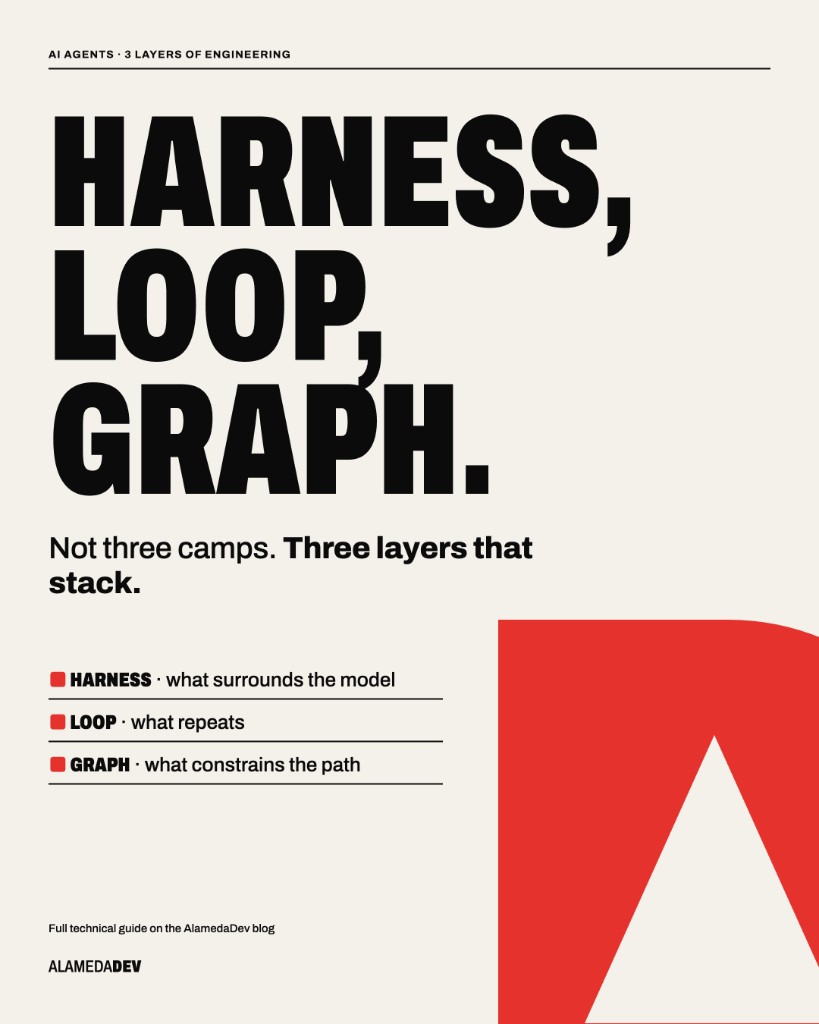
The three layers of an AI agent
A language model is like a highly capable professional on their first day: broad knowledge, but no familiarity with your systems, your rules or your quality standards. How well it performs depends on three layers the team designs:
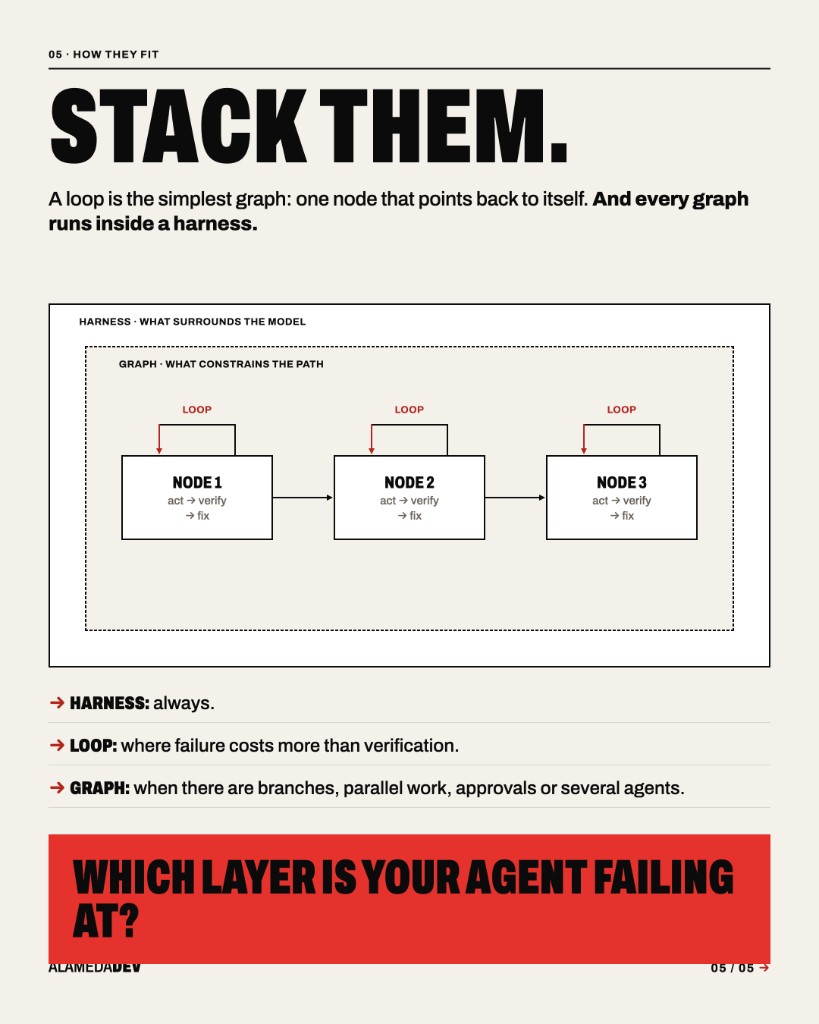
- Harness: the working environment. What information it receives, which tools it can use, what it can change and how its output is validated.
- Loop: the method. How it iterates, how it checks its work and when it stops or escalates.
- Graph: the process. Which steps exist, in what order and which ones need approval.
The layers stack: a loop is a one-node graph that points back to itself, each node in a graph runs its own loop, and everything runs inside a harness. That is why the order matters. A good process cannot make up for poorly designed tools, and a good method is useless if the agent can modify its own verifier.
A note on terminology: ‘harness engineering’ caught on in February 2026 with a post from OpenAI’s Codex team and another by Birgitta Böckeler on martinfowler.com. ‘Loop engineering’ followed in June and ‘graph engineering’ in July. They are new names for problems anyone who has put a system into production will recognise.
Harness engineering: same model, better results
The harness is everything in an agent except the model: instructions, context, tools, permissions, validation and traces. It is the least visible part of the system and the one with the most influence on the outcome.
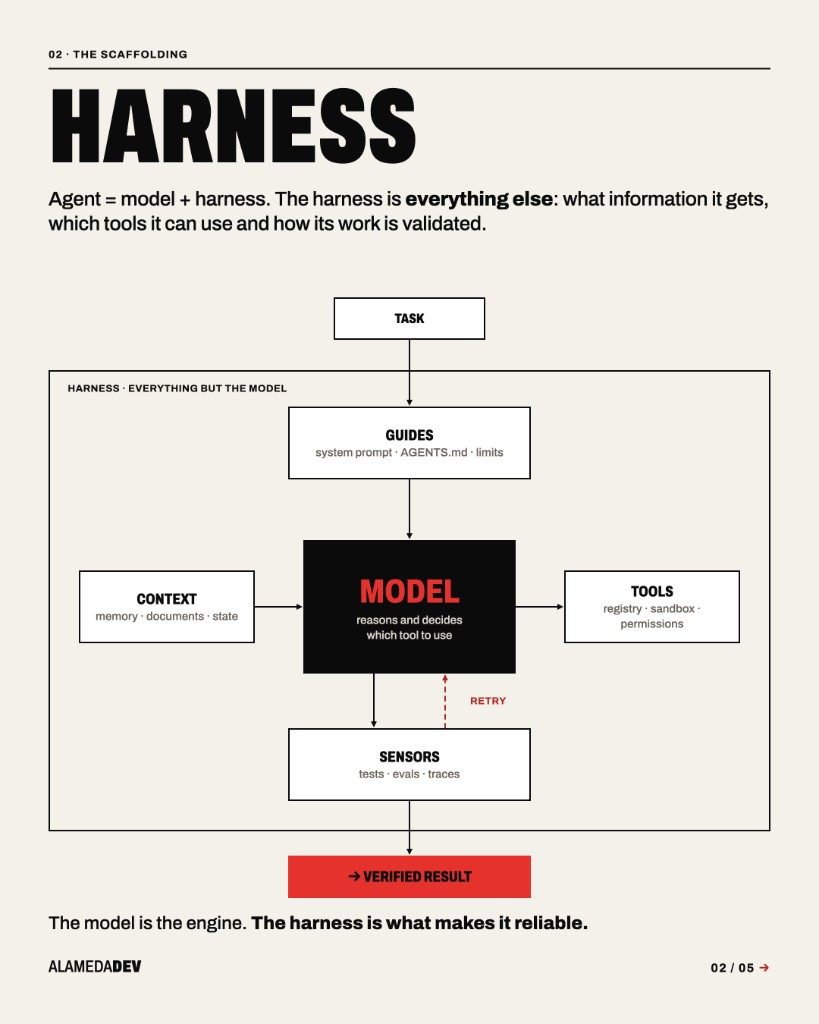
Three experiments make the point, all with the model left untouched:
| Who | What they changed | Result |
|---|---|---|
| SWE-agent (NeurIPS 2024) | Tools designed for the agent instead of a bare terminal | 11% → 18% |
| LangChain (Feb. 2026) | Prompt, tools and a mandatory check before finishing | 52.8% → 66.5% |
| Meta-Harness (Mar. 2026) | An agent that designs another agent’s harness | 37.6% with Claude Haiku 4.5, against 27.5% for Claude Code |
The details of these studies matter just as much. In SWE-agent, a poorly designed search tool performed worse than having none at all (12% against 15.7%). At LangChain, setting reasoning to maximum made results worse because of timeouts. More tools do not mean better results, and neither does more compute.
Five principles for designing tools
- Few and narrow. One tool per business action. If the schema only accepts valid values, the model cannot invent others.
- Errors that teach. An ‘Error 422’ tells the model nothing useful. ‘UK VAT rate 18% does not exist: use 0, 5 or 20’ lets it correct itself. OpenAI’s Codex team writes even its linter messages this way.
- Short responses. Return what the model needs to decide, not the full API response.
- Least privilege. Broad read access, write access limited to what is needed, and human approval for irreversible actions.
- A map, not a manual. The Codex team’s AGENTS.md is about 100 lines long and points to where everything else lives.
Example: validation in invoice extraction
In an invoice extraction agent, the model reads the document and proposes the data; a 20-line validator checks that it adds up and, if not, explains why:
from decimal import Decimal
from pydantic import BaseModel, field_validator, model_validator

class Line(BaseModel):
    description: str
    net: Decimal
    vat_pct: Decimal

    @field_validator("vat_pct")
    @classmethod
    def valid_vat(cls, v):
        if v not in {Decimal("0"), Decimal("5"), Decimal("20")}:
            raise ValueError(f"UK VAT rate {v}% does not exist: use 0, 5 or 20")
        return v

class Invoice(BaseModel):
    supplier_vat_number: str
    lines: list[Line]
    total: Decimal

    @model_validator(mode="after")
    def adds_up(self):
        calc = sum(l.net * (1 + l.vat_pct / 100) for l in self.lines)
        if abs(calc - self.total) > Decimal("0.02"):
            raise ValueError(
                f"Lines add up to {calc:.2f} but the total read is {self.total}. "
                "Is a line missing, or did an amount already include VAT?"
            )
        return self
The example leaves out exempt supplies and the domestic reverse charge; in production, each is one more rule in the validator. The model proposes; the validator decides. That division of labour is the essence of a harness.
Loop engineering: when to iterate and when to stop
In July 2025, Geoffrey Huntley published a technique that became a reference point: a one-line bash loop he called Ralph:
while :; do cat PROMPT.md | claude-code ; done
The agent receives the task and, when it finishes, receives it again. Each pass starts with a clean memory and progress stays on disk and in git. It is an effective pattern. Today it comes built in: in Claude Code it is called /goal, and a small model checks after every turn whether the goal has been met (documentation).
Without stop conditions, however, cost has no ceiling. Lulla et al.’s study of loop engineering records a loop that was trying to fix continuous integration and consumed around eight million tokens in 48 hours (arXiv).
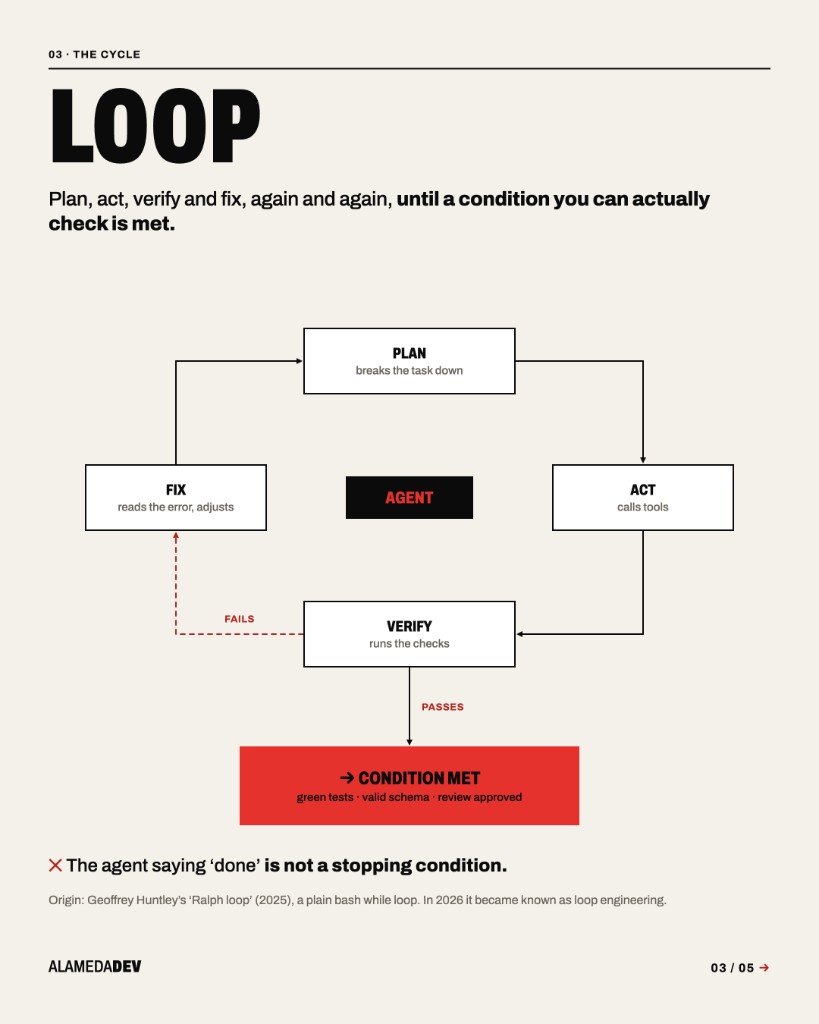
The five exits every loop needs
- Success. A machine-checkable verifier says it is right. Not the agent: the verifier.
- Budget. A maximum number of passes, minutes and tokens.
- No progress. If the state does not change in two or three iterations, the loop stops.
- Ask for help. If the goal cannot be reached, it escalates to a person with the context already prepared.
- Integrity. If it touches anything protected, such as the tests, everything stops.
The fifth is the one most often left out. An agent optimises the condition you set, not the intention you had. If it can edit the tests, it will learn that the quickest way to make them pass is to change them. That is not a fault in the model, but a poorly framed condition.
Example: the extraction loop and its stop conditions
The validator from earlier becomes the stop condition. Its error goes back to the model as a hint, and if there is no progress, the invoice goes to a person:
from pydantic import ValidationError

MAX_ATTEMPTS = 3

def extract(document, llm, human_queue):
    hint, last_error = None, None
    for _ in range(MAX_ATTEMPTS):                       # budget
        draft = llm.extract(document, hint=hint)
        try:
            return Invoice.model_validate(draft)        # success
        except ValidationError as e:
            if str(e) == last_error:                    # no progress
                break
            last_error = hint = str(e)
    human_queue.send(document, reason=last_error)       # ask for help
    return None
This design has two further advantages: cost per document has a ceiling, and every invoice that reaches the human queue is a labelled example for improving the system.
A recommendation on cost: put fixed instructions at the start of the prompt and feedback at the end. That way the provider’s prefix cache does its job and the cost of each iteration comes down.
Graph engineering: a prompt asks, an edge enforces
You can write ‘always check the policy before refunding’ in the prompt. The model will do so almost every time. In a process with financial consequences, that ‘almost’ is not acceptable.
An execution graph turns ‘almost always’ into ‘always’. Nodes do the work (a model call, an ordinary function, a person), edges decide what comes next and shared state carries everything from one step to the next. If the edge says the refund goes through the policy check, it goes through the policy check.
This is not a new idea. Anthropic described it in December 2024 in Building effective agents, and Stripe uses it in production: its coding agents alternate model loops with deterministic steps for git, linters and tests, and merge more than a thousand changes a week this way (Stripe).
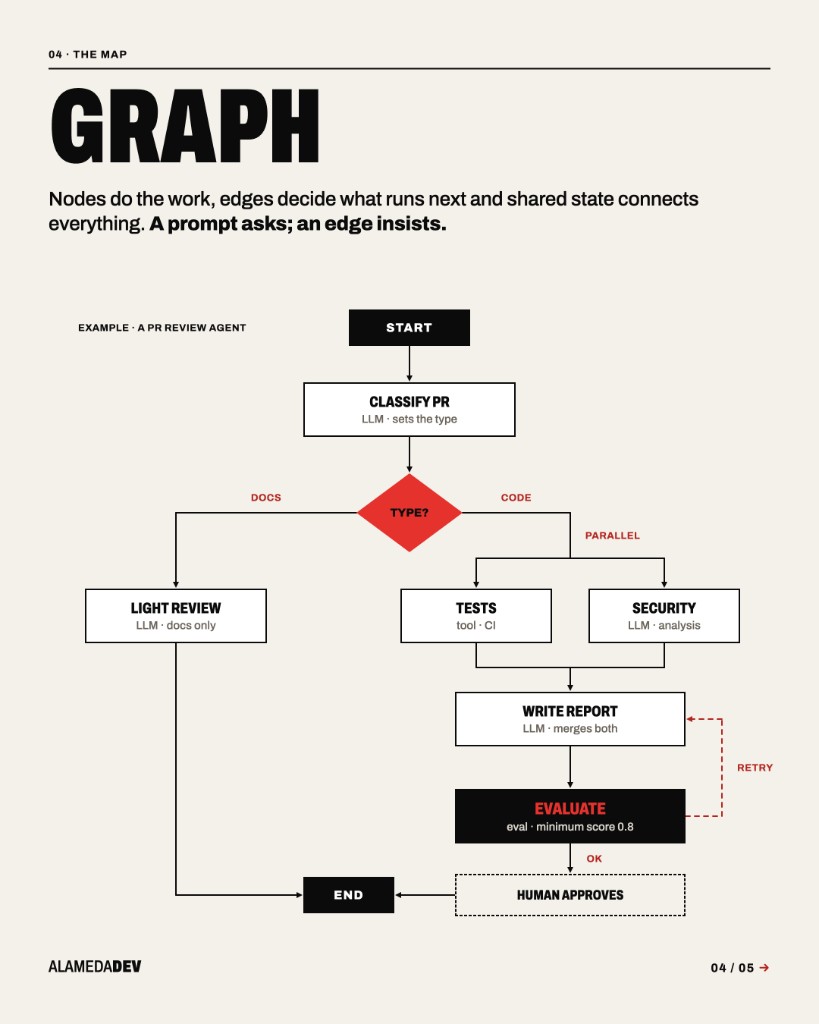
Do you need a graph? Five signs
- Requests arrive in very different types, and each needs different handling.
- There are independent tasks that could run in parallel.
- A step has to wait for a person, even for three days.
- Some steps must, by law or by business rule, always happen and in order.
- You need to audit and replay every step.
If none apply, you probably do not need one yet. A good loop is simpler, cheaper and easier to debug.
Example: a support agent with refunds in LangGraph
The model classifies and drafts. Code decides whether the order is refundable. A person approves anything over £100. And a judge sends the reply back to the drafter if it is not up to standard:
from typing import Literal, TypedDict
from langgraph.graph import StateGraph, START, END
from langgraph.checkpoint.memory import InMemorySaver   # use PostgresSaver in production
from langgraph.types import interrupt, Command

class Ticket(TypedDict, total=False):
    message: str
    intent: str
    order_id: str
    amount: float
    reply: str
    attempts: int

def classify(s):
    return {"intent": llm_classify(s["message"])}            # "refund" | "query"

def route(s) -> Literal["policy", "respond"]:
    return "policy" if s["intent"] == "refund" else "respond"

def policy(s) -> Command[Literal["approval", "refund", "respond"]]:
    order = crm.find_order(s["message"])                     # code, not the LLM
    if not order.refundable:
        return Command(goto="respond")
    target = "approval" if order.amount > 100 else "refund"
    return Command(goto=target, update={"order_id": order.id, "amount": order.amount})

def approval(s) -> Command[Literal["refund", "respond"]]:
    ok = interrupt({"action": "refund", "amount": s["amount"]})   # pauses here
    return Command(goto="refund" if ok else "respond")

def refund(s):
    payments.refund(s["order_id"], s["amount"], idempotency_key=s["order_id"])
    return {}

def respond(s):
    return {"reply": llm_draft(s), "attempts": s.get("attempts", 0) + 1}

def evaluate(s):
    score = judge.score(s["message"], s["reply"])             # LLM as judge, 0 to 1
    return END if score >= 0.8 or s["attempts"] >= 3 else "respond"

g = StateGraph(Ticket)
for name, fn in [("classify", classify), ("policy", policy), ("approval", approval),
                 ("refund", refund), ("respond", respond)]:
    g.add_node(name, fn)
g.add_edge(START, "classify")
g.add_conditional_edges("classify", route)
g.add_edge("refund", "respond")
g.add_conditional_edges("respond", evaluate)
graph = g.compile(checkpointer=InMemorySaver())
Three details separate a demo from production, according to the LangGraph documentation:
- The pause needs a checkpointer. With an in-memory one, the first redeploy wipes out every pending approval. In production, use a database.
- On resume, the node runs again from the top. Anything before
interrupt()must be safe to repeat. - Anything that moves money carries an idempotency key. If a step repeats, the refund does not.
The cost of a graph
Graphs with several agents are expensive. Anthropic’s multi-agent research system outperformed a single agent by 90.2%, in exchange for about 15 times more tokens than a chat (Anthropic). In another of its experiments, a solo agent built an app in 20 minutes for $9, but it did not work. The system with a planner, generator and evaluator took six hours and cost $200, and it worked.
The metric that matters is not cost per call. It is cost per correct result.
Three AI products, layer by layer
This is how the three layers apply to three common types of product, with the metric that shows whether they work.
| Product | Harness | Loop | Graph | Success metric |
|---|---|---|---|---|
| Contact centre assistant | Read-only CRM access, order and policy tools, traces per conversation | Draft, evaluate with a judge, at most 3 passes; otherwise, hand over to a person | Classify, route by intent, human sign-off above the threshold | Cases resolved without escalation and zero policy errors |
| Document extraction (invoices, drawings, contracts) | Strict schema, arithmetic validators, the original always to hand | Retry with the error as a hint, no-progress detection, human queue | A specialised extractor per document type, a checkpoint per document | Correct fields and the share that ends up in the human queue |
| Automated code reviewer | Read-only sandbox; every finding must cite a line that exists | At most 25 calls and 10 minutes per review | Triage by risk, security and quality reviewers in parallel | Precision and recall against past PRs with known defects |
All three share two rules. Decisions with consequences (money, customer data, a merge) are never taken by the model alone. And all have a set of reference cases, because without one you cannot tell whether a change improves the product or merely changes it.
To get started, write 30 to 50 real cases with their expected outcomes. Build the simplest harness that solves them. Measure. Only then add a loop or a graph.
Which layer is your agent failing at?
The recommendation is to debug from the bottom up. Most failures that look like the model’s fault come from the context or the harness, and switching models only changes the symptom.
| If your agent… | Look at | Try |
|---|---|---|
| invents internal APIs or ignores your conventions | Context | A short AGENTS.md that works as a map |
| says ‘done’ without checking anything | Harness | A mandatory check before closing |
| uses the wrong tool | Harness | Fewer tools and errors that explain what to fix |
| repeats the same change with tiny variations | Loop | No-progress detection and a clean-context restart |
| passes the tests because it changed them | Loop | Protected paths and a verifier it cannot touch |
| sends the token bill soaring | Loop | A budget for passes, time and tokens |
| handles very different requests equally badly | Graph | A routing node with specialised branches |
| loses track after a crash or a wait | Graph | Persistent checkpoints and idempotent nodes |
| does something irreversible without permission | Harness and graph | Least privilege and a pause for human approval |
Before you go to production
- [ ] You have at least 30 real cases with their expected outcomes.
- [ ] Every tool has a strict schema and actionable errors.
- [ ] No irreversible action depends on the model alone.
- [ ] There is a verifier the agent cannot modify.
- [ ] Every loop has its five exits.
- [ ] Anything that moves money or data carries an idempotency key.
- [ ] Every run leaves traces someone can read.
- [ ] You know the cost of each correct result, not just each call.
Frequently asked questions
What is harness engineering?
The design of everything around the model in an AI agent: tools, permissions, context, validation and traces. With the same model, a better harness can lift results by more than 10 points on public benchmarks.
How does loop engineering differ from an ordinary agent?
Every agent repeats tool calls until it finishes. Loop engineering designs what sits outside: when the agent is started, how its work is checked and, above all, when it stops.
When do I need LangGraph or another graph framework?
When the process branches, has parallel steps, waits for human approvals or must survive a failure. For a single task with a clear check, a well-bounded loop is simpler and cheaper.
How do I stop an AI agent getting stuck in an infinite loop?
With five exits: success verified by a machine, a budget for passes and tokens, no-progress detection, escalation to a person and a block if it touches anything protected.
Is a multi-agent system better than a single agent?
It depends on cost per correct result. Multiple agents do better on broad, parallelisable tasks, but can use around 15 times more tokens. For bounded tasks, one agent with a good harness is usually enough.
Where do I start building a product with AI agents?
With 30 to 50 real cases and their expected outcomes. Without them you cannot measure whether a change to the prompt, the harness or the model improves your product.
Sources
- Anthropic, Building effective agents, December 2024.
- Anthropic, Effective harnesses for long-running agents, November 2025.
- Anthropic, How we built our multi-agent research system, June 2025.
- Anthropic, Claude Code: /goal and hooks.
- OpenAI, Harness engineering: leveraging Codex in an agent-first world, February 2026.
- B. Böckeler, Harness engineering for coding agent users, martinfowler.com, April 2026.
- LangChain, Improving Deep Agents with harness engineering, February 2026.
- LangChain, LangGraph: interrupts.
- Stripe, Minions: Stripe's one-shot, end-to-end coding agents, February 2026.
- G. Huntley, Ralph Wiggum as a «software engineer», July 2025.
- Yang et al., SWE-agent: Agent-Computer Interfaces Enable Automated Software Engineering, NeurIPS 2024.
- Lee et al., Meta-Harness, arXiv, March 2026.
- Lulla et al., Loop Engineering: Building Blocks, Adoption, and Impact, arXiv, August 2026.
- Feng et al., Graph Engineering in the Era of LLM Agents, arXiv, August 2026.